This article is dedicated to Moaaz Mahdi.
Introduction
This article will introduce you to a brilliant program called Pandoc by
John MacFarlane. Pandoc is a utility that converts documents between
different formats. The list of supported document formats is huge but
ones which might be of universal interest are Microsoft Docx, HTML, LaTeX,
Markdown, and Epub.
Pandoc may not seem that useful in the beginning but as we go through this
article, you will come to love the different scenarios it can be applied to.
Pandoc gets its name from a combination of the words ‘pan-’ and ‘document’.
‘Pan-’, in its combining form, means, “involving all of a (specified) group or
region, e.g., Pan-American”, thus Pan-Document, and finally Pandoc.
Installation
First, download the installer for your system. Pandoc is available for
Windows, Linux, and macOS. The latest version as of this writing is
v1.18. Pandoc releases can be viewed on its GitHub Releases page.
Installation methods may vary slightly depending on the system but it should
be straightforward nonetheless. Do note that Pandoc is a command-line
application and thus you will not find any shortcuts in the regular places
(for Windows, this would be the Start menu and Desktop). You can check if your
installation was successful by opening your command prompt and entering,
pandoc --version
which would produce the following (if using v1.18; v1.17 and earlier will show
different information)
pandoc 1.18
Compiled with pandoc-types 1.17.0.4, texmath 0.8.6.6, highlighting-kate 0.6.3
Default user data directory: C:\Users\Khalid\AppData\Roaming\pandoc
Copyright (C) 2006-2016 John MacFarlane
Web:  http://pandoc.org
This is free software; see the source for copying conditions.
There is no warranty, not even for merchantability or fitness
for a particular purpose.
If you get the same output as above, then congratulations, you’ve got Pandoc
installed.
Markdown
In order to use Pandoc efficiently, it is wise to learn one of its many text-
file based document markups. I suggest learning Markdown as it’s the most
used as per my experience. Learning a markup syntax for storing documents is a
different approach compared to one most people will be used to (i.e. using
word processors such as Microsoft Word). It offers a WYSIWYM (What You See
Is What You Mean) approach as opposed to WYSIWYG (What You See Is What
You Get). Such an approach, has a few advantages,
Forces you to focus on your content instead of both content and
presentation. Proper arrangement of your content has added benefits in the
resultant format. For example, table of contents in docx documents can be
automatically generated.
Text files have been around for a long time. Documents created in this
format even 20 years ago can still be read today.
A range of text editors are available for all major operating systems. Thus
documents are not tied to a certain format which would require special
software which may or may not decide to retain backwards compatibility with
older versions of their format as time passes (for example, files created in
Microsoft Word 2003 may have some trouble opening in the shiny Microsoft Word
2016).
They can be used for more than just documents. A markdown text file can be
used for presentations and blog posts as well (there may be others, but these
two are what I’ve used so far).
What is Markdown, really?
Markdown is just syntax for representing content. You can, believe it or
not, create Markdown text documents on your computer at this very moment. All
you need to do is create a text document and type away. The syntax helps
identify elements of your text file. For example, if you split a document into
parts, let’s say a thesis, each part is represented as a section/chapter,
subsection, and subsubsection; these will be represented by the headings
syntax as follows,
# Introduction

Lorem ipsum dolor sit amet, consectetur adipisicing elit. Laudantium
voluptates laboriosam, eaque voluptatem vitae earum quos similique veniam
inventore ducimus recusandae facilis nulla mollitia optio hic, magnam, quidem
ex officiis?

# Background of Study

## Current state of Pakistan

## Complications of Supreme Court

# Problem Statement

...

# References
Similarly, for bold and italics, surround the word/phrase with two asterisks
or an underscore respectively (quite similar to WhatsApp). This is
demonstrated as follows,
This is a sentence with **bold** and _italic_ text.
I’m not going to explain all the other syntax. Please refer to the following
web pages for reference:
- Daring Fireball: Markdown Basics
- Daring Fireball: Markdown Syntax
Markdown Flavors
Hopefully at this stage, you should have a basic understanding of Markdown
along with some of its syntax. Now, we’ll move on to flavors. Markdown in the
beginning was limited some basic syntax and once it caught on, people wanted
syntax for other things which were not thought of in the beginning. Examples
of this include, tables and definition lists, and footnotes to name a few.
Different groups of people expanded on Markdown in different ways and thus we
have Markdown “flavors”. Some of the more popular flavors that I’ve come
across are “MultiMarkdown”, “PHP Markdown”, and “GitHub Markdown”.
This seems like a problem that has to be fixed, i.e., having many different
flavors of Markdown, and it is. There has been a movement to unify different
flavors into a global flavor but it hasn’t gained widespread acceptance as of yet. It is called CommonMark.
You’ll have to keep this in mind when dealing with rare syntax that is only
supported in a subset of all the flavors available, for example, multi-column cell
tables.
First steps with Pandoc
To show you what Pandoc is capable of, let’s create a sample Markdown
document called myDocument.md as follows:
# Introduction

**Lorem** ipsum dolor sit _amet_, "consectetur" adipisicing elit. Veritatis, quidem
facere incidunt quae velit sit repellendus perferendis! Vel, deleniti nulla
hic eaque, quibusdam obcaecati molestias, maxime similique sint quos harum.

## Background Study

Lorem ipsum dolor sit amet, consectetur adipisicing elit. Quisquam rem, vitae
minus provident maiores quae laborum rerum, numquam! Doloribus atque veritatis
earum deleniti accusantium, quidem possimus consequuntur a inventore minima!

# Research Methodology

Lorem ipsum dolor sit amet, consectetur adipisicing elit. Ab expedita impedit
nulla fuga numquam corporis sit voluptates quo, deleniti, quam in praesentium!
Pariatur eius, quibusdam quam et expedita quia dolores.

The following is a list of items:

1. The first item
2. The second item
3. The third item

# References
When done, open a command prompt in the same directory you had saved the Markdown file, and run,
pandoc -t docx -o myDocument.docx --smart myDocument.md
This will create a Microsoft Word document containing your content into the same directory. Let’s break down the command into understandable pieces,
pandoc, the name of the application, if it wasn’t obvious already.-t docx, meaning, convert to docx.-o myDocument.docx, the name of our output file with the extension.--smart, convert straight quotes to fancy quotes.- And finally, the name of our source document,
myDocument.md in this case.
Here is a preview of the document,
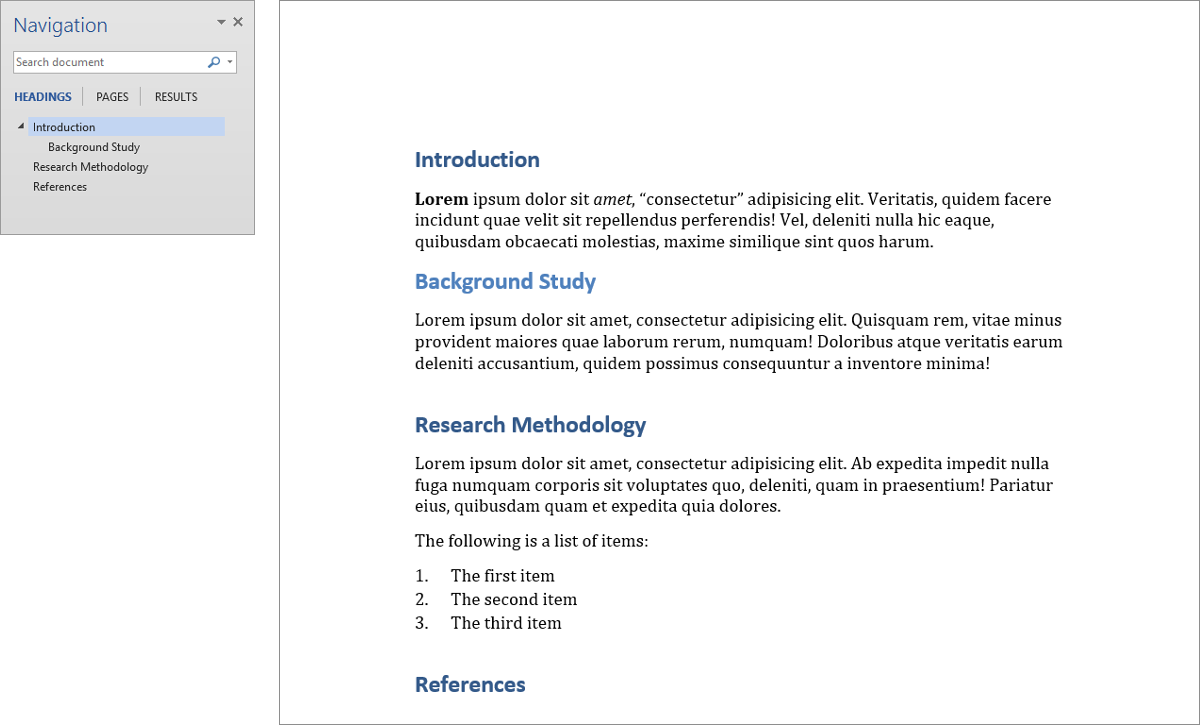
Docx output with the navigation pane
Citations/References
You’ll be pleased to know that Pandoc supports citations/references in its
syntax. To use it, you’ll need a bibliography file which can be in a number of
different formats. We’ll be using BibTeX for this tutorial. For a list of
all possible formats, please see the Pandoc Citations.
First, we’ll create our bibliography file. I’ve selected three articles from
Google Scholar about Cloud Computing and created a file named
references.bib, with the following contents.
@article{mell2011nist,
  title={The NIST definition of cloud computing},
  author={Mell, Peter and Grance, Tim},
  year={2011},
  publisher={Computer Security Division, Information Technology Laboratory, National Institute of Standards and Technology Gaithersburg}
}

@article{armbrust2010view,
  title={A view of cloud computing},
  author={Armbrust, Michael and Fox, Armando and Griffith, Rean and Joseph, Anthony D and Katz, Randy and Konwinski, Andy and Lee, Gunho and Patterson, David and Rabkin, Ariel and Stoica, Ion and others},
  journal={Communications of the ACM},
  volume={53},
  number={4},
  pages={50--58},
  year={2010},
  publisher={ACM}
}

@article{computing2011cloud,
  title={Cloud computing privacy concerns on our doorstep},
  author={ComPUtING, CLoUD},
  journal={Communications of the ACM},
  volume={54},
  number={1},
  pages={36--38},
  year={2011}
}
Second, we’ll cite the references using their key in our source document as shown below. Pay attention to the difference when citing at the beginning and end of a sentence.
# Introduction

@mell2011nist says that, **Lorem** ipsum dolor sit _amet_, "consectetur"
adipisicing elit. Veritatis, quidem facere incidunt quae velit sit repellendus
perferendis! Vel, deleniti nulla hic eaque, quibusdam obcaecati molestias,
maxime similique sint quos harum.

## Background Study

Lorem ipsum dolor sit amet, consectetur adipisicing elit. Quisquam rem, vitae
minus provident maiores quae laborum rerum, numquam! Doloribus atque veritatis
earum deleniti accusantium [@armbrust2010view], quidem possimus consequuntur a
inventore minima!

# Research Methodology

Lorem ipsum dolor sit amet, consectetur adipisicing elit. Ab expedita impedit
nulla fuga numquam corporis sit voluptates quo, deleniti, quam in praesentium!
Pariatur eius, quibusdam quam et expedita quia dolores [@computing2011cloud, p.37].

The following is a list of items:

1. The first item
2. The second item
3. The third item

# References
Third, we’ll have to define a CSL (Citation Style Language) file. A CSL file
defines how to style the references at the end of a document. By default,
Pandoc uses the Chicago Manual of Style author-date format. Using different
styles will be explained in the following subsection.
Finally, once everything is in place, for a docx file, type the following,
pandoc -t docx -o myDocument.docx --smart --bibliography references.bib --filter pandoc-citeproc myDocument.md
I’ll explain some of the new commands we’ve typed:
--bibliography, a command to define the bibliography. Whatever follows this command will be the name of the bibliography file, references.bib in this case.--filter, a command to define filters that would go through your source file. In this case we’re going to use pandoc-citeproc to process our citations.
This command will result in the following document content, I’ve only selected the parts that will show the effects of our citation processing.

Docx output with citations in main text
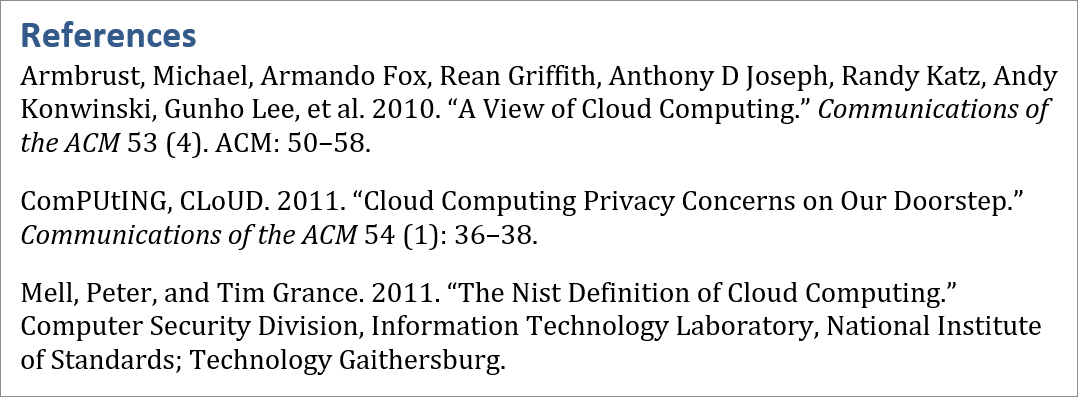
Docx end-of-document bibliography
Different CSL styles
Now on to different citation styles. You will have to find the CSL for your specific style or write one yourself if it doesn’t exist. Fortunately, most of the well known styles already have a CSL file created for them and you can just download it and put it in the folder along with your other files.
One of the places where you can download CSL files is this massive repository on GitHub. For this tutorial, we’ll use the IEEE style file. You should have the following directory structure,
.
|-- ieee.csl
|-- myDocument.docx
|-- myDocument.md
`-- references.bib

0 directories, 4 files
Now, run the following command,
pandoc -t docx -o myDocument.docx --smart --bibliography references.bib --filter pandoc-citeproc --csl ieee.csl myDocument.md
We introduce only one new command here,
--csl which is used to tell Pandoc which CSL file to use. In this case, the file is located in the same directory so we just type the name of the file.
The citation style will change in both the main text and the bibliography section of your document accordingly. The following shows a preview of the bibliography section.
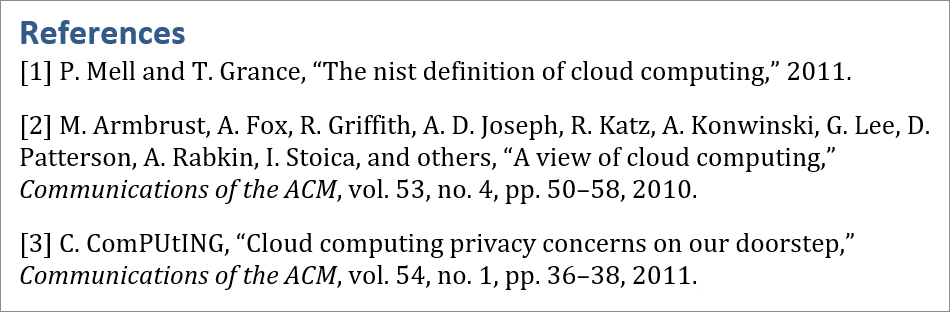
Docx end-of-document bibliography in IEEE style
YAML Front matter
This section will introduce you to YAML (Yet Another Markup Language) front matter which you can use to simplify the commands used to generate your document and also to add meta data to your document. Building on the previous example, we have the following markdown file with YAML front matter (forgive the syntax highlighting),
---
title: The Title of your Document
author: Author Name
date: 1 Rabiul Awal 1438
institution: Madrasah al-Jawziyyah
abstract: This is the abstract. Here is something interesting \
          about my paper. Please look at my results. Please   \
          cite me in your work. I'm worth reading.
keywords: first, second, third, last
bibliography: references.bib
csl: ieee.csl
---

# Introduction

@mell2011nist says that, **Lorem** ipsum dolor sit _amet_, "consectetur"
adipisicing elit. Veritatis, quidem facere incidunt quae velit sit repellendus
perferendis! Vel, deleniti nulla hic eaque, quibusdam obcaecati molestias,
maxime similique sint quos harum.

. . .
As can be seen from the example, the YAML section is surrounded with three dashes ---. Within this section, all the required variables are declared with special emphasis on bibliography and csl which were part of our command used earlier on. You can find a complete list of all the possible variables usable at Pandoc Variables. Please note that not all variables are usable in
all formats.
Now, on to processing our document. Notice how our command has now become much shorter,
pandoc -t docx -o myDocument.docx --smart --filter pandoc-citeproc myDocument.md
I’ve highlighted the preview of the beginning of the generated document,
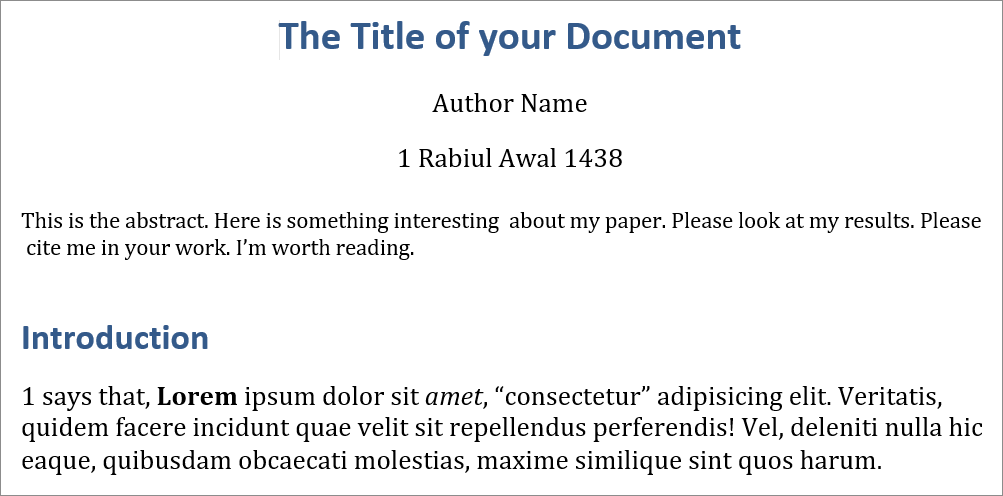
Docx end-of-document bibliography
The End
I hope this short introduction was enough to get you interested in using Pandoc for all your future endeavors in composing documents.